So you heard about Tiranga Game, and you want to give it a try. The first thing you need to do is create an account. That’s what registration means — just signing up so the app knows who you are.
The whole process takes about 2 minutes. You don’t need any special documents, you don’t need to be a tech person, and it’s completely free to sign up. This guide will walk you through every single step, one at a time, in simple words.
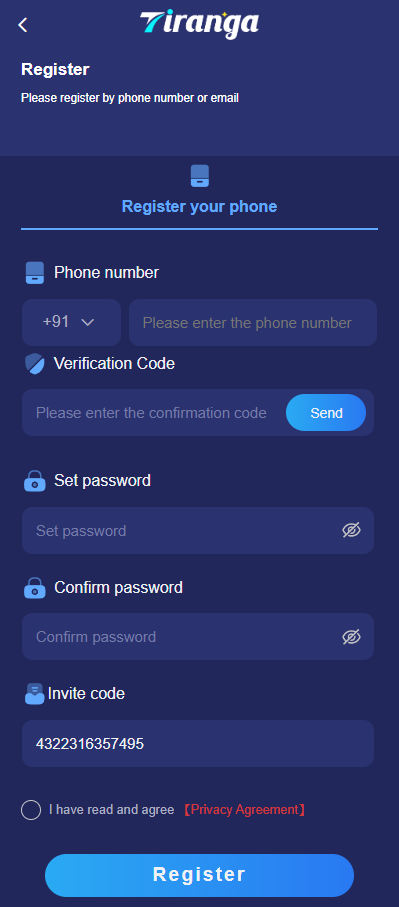
Table of Contents
Before you start — what do you need?
Keep these things ready before you begin. That’s all you need:
Your mobile phone number
This is the most important one. Your number becomes your login ID forever.
A password you will remember
Make it at least 6 characters. Mix letters and numbers — like “Niraj2025game”.
A working internet connection
Wi-Fi or mobile data, either works fine.
A referral code (optional, but helpful)
If a friend referred you, their code gives both of you a bonus. Not required, though.
Step-by-step Registration Guide
Follow these steps in order. Don’t skip any.
Open the Tiranga Game website or app
Go to the official Tiranga Game website on your phone or open the app if you have already installed it. Do not use any random link from WhatsApp or Google. Always use the official address.
Important: official site only
Tap on the “Register” button
On the home screen, you will see two buttons — Login and Register. Since you are new here, tap Register. This opens the sign-up form.
Type in your mobile number
Enter your 10-digit Indian mobile number. Make sure you type it correctly — this number will be your permanent login ID, so no mistakes here. Double-check before moving on.
Create a password
Think of a password that’s easy for you to remember but hard for others to guess. Something like a mix of your name, a number, and a word works well. Type it in the password field, then type it again in the “confirm password” box to make sure they match.
Enter the referral code (if you have one)
You will see a box that says “Referral Code” or “Invite Code.” If a friend shared their code with you, enter it here. You will both get a bonus once you make your first deposit. If you don’t have a code, you can leave this blank — registration still works.
Verify your number with OTP
After filling in the form, the app will send a 4 or 6-digit OTP (One Time Password) to your mobile number via SMS. Check your messages, find that number, and type it into the box on screen. You have about 5 minutes before it expires, so do this quickly.
Tap “Register” or “Submit”
Once you have entered the OTP, hit the Register or Submit button. If everything is correct, your account is created right then and there. The app will usually log you in automatically.
You are in — explore your account
That’s it. Your account is ready. You will land on the home screen of the game. Take a look around, check your wallet, and see what games are available. To start playing, you will need to make a small deposit first.
Quick tip: Write down your mobile number and password somewhere safe right after registering. Many people forget their passwords later and have to reset them. Saves you the trouble.
Mistakes people often make during registration
These small errors can cause problems later. Good to know them in advance.
Wrong phone number
One digit off means OTP goes to someone else. Check twice before submitting.
Forgetting the password
People set a random password and forget it. Write it down somewhere.
Missing the OTP window
OTP expires in 5 minutes. Don’t wait — check your SMS right away.
Using a fake referral code
If the code doesn’t exist, you won’t get the bonus. Use a real one from a friend.
Creating two accounts
One person, one account. Two accounts can get you banned from the platform.
Downloading from a fake site
Always register on the official Tiranga Game site. Fake sites steal your details.
Note: Never share your OTP with anyone — not even with someone who claims to be Tiranga Game support. Real support staff never ask for your OTP. If someone asks for it, it’s a scam.
What happens after you register?
Once your account is created, you are technically a member. But to actually play games and win money, you need to add some funds to your wallet. Go to the “Recharge” or “Deposit” section in the app, choose an amount, and pay via UPI, bank transfer, or whatever option is available. Most platforms have a minimum deposit of around ₹100.
After your first deposit, you can start playing immediately. The most popular games on Tiranga are colour prediction rounds — you pick a colour, place your bet, and wait for the result. It’s fast, simple, and that’s why so many people enjoy it.
Common questions
Q: Is registration on Tiranga Game free?
Yes, completely free. You don’t pay anything to create an account. You only spend money when you choose to deposit and play.
Q: What if I don’t receive the OTP?
Wait about 60 seconds, then tap “Resend OTP.” If it still doesn’t arrive, check if your number is correct or if you have mobile data. Sometimes SMS takes a minute or two.
Q: Can I register with a friend’s number?
No. The OTP goes to the number you registered with. If you use someone else’s number, the OTP goes to them — and your account will be linked to their number, not yours. Always use your own number.
Q: I made a mistake in my number during registration. What do I do?
If the OTP verification failed, you can try again with the correct number. If you somehow completed registration with the wrong number, contact Tiranga Game support to fix it.
Q: Can I change my phone number later?
This depends on the platform’s current policy. Some platforms allow it through customer support after identity verification. It’s not something you can do yourself from within the app settings.
Q: Is my personal information safe?
Tiranga Game only asks for your phone number at registration — no ID, no address, nothing extra. Just make sure you’re on the official website and not a copycat site.